
Residential Services
Home Automation in Phoenix, Arizona
Audio Video by Design will make your house work for you,
not the other way around.

Home Automation Solutions
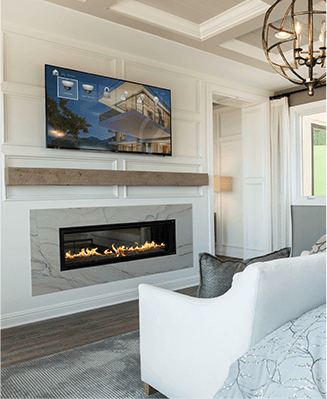
A fully integrated AV system requires an in-depth design procedure to assure that all of the components and sub-systems work together properly. Without a proper design, you may be subject to hidden charges later.
Home automation built around the way you live
A useful smart home starts with a familiar moment: arriving after dark, getting everyone ready in the morning, or settling in for a movie. Decide what should happen during that moment, then choose the equipment and controls that can support it. That approach keeps the project focused on daily convenience instead of a collection of unrelated apps.
Control and automation work together. A keypad or touchscreen gives you a direct choice; an automation acts on a schedule or a supported event. A movie scene might lower compatible shades and dim selected lights when you press a button. A sunset schedule could turn on the entry lights without a command. Both should allow you to make a different choice when plans change.
For a Phoenix home, priorities might include managing afternoon glare, adjusting cooling before a return from travel, and making entertainment easy for guests. Start with the rooms and routines that matter most.
Automate Your Home Today!
Transform your living space into a smart home, where convenience and efficiency are just a touch away.
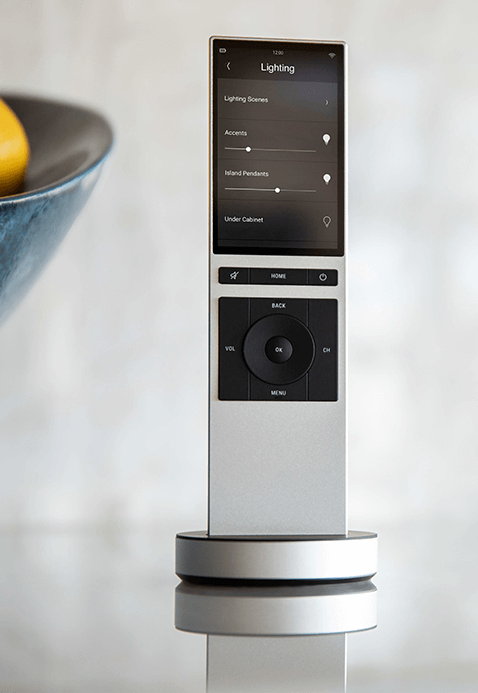
Solutions Driven Technology
“Home Automation” is the latest buzz word. “Everybody does Home Automation now. I can even get it through my alarm.” Sound familiar? Can you get Home Automation through your alarm? No. You can get a motorized lock, an integrated thermostat, and some light control. But what makes that Automate? Just because you open an app to turn the light on does not make it Automate. It makes it controlled. “Well, I can get Automate lights from xyz company. I can get garage door company from yxa company. I have an app for each one.
That is automation!” Again, all just controlled, and the only person that can figure out how to use all those apps is the one who set it up. What good does that do? Instead, imagine this… When you pull in the garage after dark, do you want the lights inside the entry door to come on for you? Then when you disarm the alarm, do you want the hallway paths to light up? When you tell your home to start party mode do you want it to automatically set lights, music, thermostats, pool lights, fountains, and door locks to where you want them all set? Try asking your alarm “Home Automation” to do that! Let us show that Home Automation is more than a buzz word. Audio Video by Design will make your house work for you, not the other way around.
Choose compatible systems with a clear path to expand
A device working in its own app does not automatically mean every function will be available through a home automation system. Compatibility depends on the exact model, its supported connection method, available integration software and sometimes a manufacturer account or subscription. An existing thermostat, streaming service or television should be reviewed individually before it becomes part of the design.
The network is another part of the system. Controllers, touchscreens, wireless accessories and remote services need the appropriate connections in the places where they will be used. A strong Wi-Fi signal alone does not settle every issue: wired connections, equipment locations, internet access and the control platform all affect the result.
It also helps to agree on priorities during an outage. Some local controls may remain available, while remote access, cloud voice commands or streaming may stop. Ask which functions depend on the internet and what each room can still do.
Three decisions that shape a smart home project
Bring a floor plan, a list of equipment you want to keep and three routines you would like to simplify. These details make a consultation more productive and help distinguish essential work from optional additions.
1. Define each scene and its exceptions
Describe the result in plain language: which lights change, which shades move and which rooms play music. Then identify exceptions, such as a sleeping bedroom that should stay untouched. A good scene has a predictable outcome, a straightforward way to override it and a name everyone in the household understands.
2. Match the installation to your home
New construction offers opportunities to plan cable routes and power before walls close. An existing home may call for a combination of available wiring and wireless devices. Budget depends on room count, controlled equipment, access for wiring, interface choices and programming complexity. Phasing works best when the initial platform and infrastructure accommodate the intended next stage.
3. Decide how people will use and maintain it
Choose controls for children, visitors and anyone who prefers a physical button. Identify who owns the accounts, who may change settings and how subscriptions or software updates are handled. Before handover, review the everyday scenes, manual overrides and any agreed outage behavior. Clear instructions make the finished system easier to live with.
What We Do
Our Audio Video Services
A fully integrated AV system requires an in-depth design procedure to assure that all of the components
and sub-systems work together properly. Without a proper design, you may be subject to hidden charges later.


AV Design and Installation
A fully integrated AV system requires an in-depth design procedure to assure that all of the components and sub-systems work together properly.
View Service


Home Theater
Love watching movies? Hate going to the theater? Let us show you how we can design and install a state of the art theater in your home.
View Service


Home Automation
“Everybody does Home Automation now. I can even get it through my alarm.” Sound familiar? Can you get Home Automation through your alarm?
View Service


Whole House Audio
Music throughout is an awesome addition to any home. Play your favorite playlist throughout your home while you clean.
View Service


Distributed Video
Every start watching a movie in the family room, then decide to finish it in the master bedroom? Video Distribution fixes this issue.
View Service


Surround Sound
Do you ever think that surround sound is “too loud”? We hear this a lot. However, surround sound is no “louder” than TV sound.
View Service


Surveillance and Cameras
We all hope we never need a camera to record an event around our home. However, far too often, we do.
View Service


Computer Network and Wifi
Whether you have a full home automation system or just kids with electronic devices, the network keeps everything humming.
View Service


Audio Video Service and Repair
Don’t leave your entertainment system to just anyone. Hire the experts to make it right.
View Service


High End Audio
We can design a system that will tickle your ear while stroking your budget.
View Service


Lighting Control
Let your imagination (and a little direction from us) lead you to lighting ecstasy.
View Service


HVAC Control
HVAC control can save you enough money every year to pay for its self, four times over.
View Service


Window Coverings and Motorized Shades
You can open one or all your shades, with just a simple button press.
View Service








Testimonials
What Our Customers
Say About Us
Home automation questions worth asking
Can home automation be added to an existing house?
Often, yes. The available wiring, construction, wireless coverage and equipment compatibility determine the options. A review can identify which devices can be integrated, which need replacing and where new cable or power may be necessary. Existing homes can also be improved room by room when the wider plan is established first.
Can I begin with one room and expand later?
Yes, provided the platform, network and control approach support the intended additions. Specify the next likely rooms before buying equipment. That helps avoid a starting system that cannot accommodate the desired lighting, shades or audio later. Future compatibility should be discussed for actual product models, rather than assumed from a logo.
Will the home still work if the internet goes down?
That depends on the design. Local switches and some controller-based functions can operate without an outside connection, while remote access and cloud services need internet access. Ask for a list of local and internet-dependent functions, and distinguish an internet outage from a power failure or a problem with the home network.
Can existing lights, televisions and thermostats be included?
Some can, but each needs an individual compatibility check. Integration may expose only part of a device’s functionality. Model numbers, controller requirements and supported software matter. Retaining equipment can be sensible when it performs reliably and offers the functions you need; replacement should have a clear practical reason.
What makes a home automation quote complete?
Look for the rooms and devices included, control interfaces, wiring work, programming, testing and household instruction. Identify ongoing service charges and items supplied by others. A clear scope also states what existing equipment is retained and which requested functions are excluded, so you can compare proposals on the same basis.
Planning a coordinated home takes more than selecting individual smart devices. Use these questions to discuss the practical limits and the functions you want to rely on.
Audio Video by Design has more than 20 years of audio video experience. Learn about our team and explore our project gallery before planning your next step.
Phone Number
(480) 242-6459Office Address
30249 N. 124th Lane,
Peoria, AZ 85383
SEND US A MESSAGE


